## https://sploitus.com/exploit?id=KITPLOIT:2430001149817761422
# Bytecode Viewer
Bytecode Viewer - a lightweight user-friendly Java/Android Bytecode Viewer, Decompiler & More.
#### New Features
* Jump to Declaration
* Draggable tabs
* Patched CVE-2022-21675 (Make sure to upgrade to v2.11.X)
* Dark mode by default with multiple themes
* Translated into over 30 languages including: Arabic, German, Japanese, Mandarin, Russian, Spanish
* Plugin Writer - create and edit external plugins from within BCV
* Fixed Java & Bytecode editing/compiling
* Tabbed plugin console
* Right-click menus on the resource and search panels
* Javap disassembler
* XAPK support
* Latest dependencies (incl. decompilers like CFR, JD-GUI etc.)
* Added support to Java files compiled using JDK > 13
* Migrated to Maven
#### Links
* BCV Discord
* Website
* Source Code
* Bin/Archive
* Java Docs
* License (Copyleft)
* Credits
* Contributing
* Report Bugs
* Discussion Forum
#### Key Features
* Simply drag and drop to decompile and search Java Jars & Android APKs
* File format support for: Class, Jar, APK, DEX, XAPK, APKM, WAR, JSP, Image Resources, Text Resources & More
* 6 Built-in Java decompilers: Krakatau, CFR, Procyon, FernFlower, JADX, JD-GUI
* 3 Built-in Bytecode disassemblers, including 2 assemblers: Krakatau and Smali/BakSmali
* APK/DEX Support from Dex2Jar and Enjarify
* Built-in Java Compiler
* Advanced static-search functionality
* Customizable UI
* Plugins + Script Engine Design
* Malicious code scanning API
* Translated Into over 30 Languages Including: Arabic, German, Japanese, Mandarin, Russian, Spanish)
* Export functionality as Runnable Jar, Zip, APK, Decompile All As Zip, Etc.
* And more! Give it a try for yourself!
#### Command Line Input
root@kitploit:~
-help Displays the help menu
-clean Deletes the BCV directory
-english Forces English language translations
-list Displays the available decompilers
-decompiler <decompiler> Selects the decompiler, procyon by default
-i <input file> Selects the input file (Jar, Class, APK, ZIP, DEX all work automatically)
-o <output file> Selects the output file (Java or Java-Bytecode)
-t <target classname> Must either be the fully qualified classname or "all" to decompile all as zip
-nowait Doesn't wait for the user to read the CLI messages
## What is Bytecode Viewer?
Bytecode Viewer (BCV) is an Advanced Lightweight Java/Android Reverse Engineering Suite. Powered by several open source tools BCV is designed to aid in the reversing process.
BCV comes with 6 decompilers, 3 disassemblers, 2 assemblers, 2 APK converters, advanced searching, debugging & more.
It's written completely in Java, and it's open sourced. It's currently being maintained and developed by Konloch.
## Is there a demo?
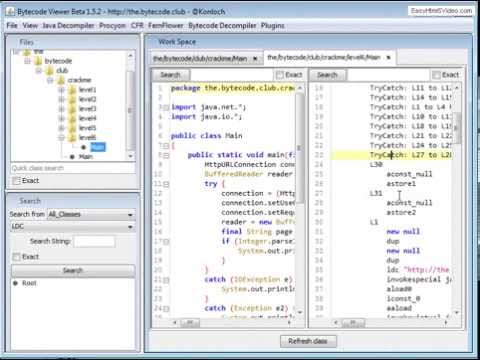
Please note this demo is from a very old version
## How do I install BCV?
Download the latest version from https://github.com/konloch/bytecode-viewer/releases and run the Bytecode-Viewer-2.10.x.jar. You may need to execute it via command line `java -jar Bytecode-Viewer-2.10.x.jar` (replace the X with the current minor version)
## How can I use BCV?
* Starting with a Jar, Zip, ClassFile or Android file (APK, DEX, XAPK, APKM, etc) drag it into BCV. It will start the decoding process automatically.
* From here you can select the decompilers you would like to use by selecting the View Pane>View 1, View 2, View 3, etc.
* The view panes are-used to display up to 3 decompilers side by side, you can also toggle edibility here.
* Select the resource you would like to open by navigating using the resource list, BCV will do its best to display it (Decompiling, Disassembling, etc).
* You can use plugins to help you search along with using the search pane in the left-hand bottom corner.
## How do the plugins work?
There is also a plugin system that will allow you to interact with the loaded classfiles. You could for example write a String deobfuscator, a malicious code searcher, or anything else you can think of.
You can either use one of the pre-written plugins, or write your own. The plugin system supports java and javascript scripting.
Once a plugin is activated, it will execute the plugin with a ClassNode ArrayList of every single class loaded in BCV, this allows the user to handle it completely using ASM.
## Instructions to compile
Just clone this repo and run `mvn package`. It's that simple!
## Working on the source
Open the Maven project (e.g. in IntelliJ, open the `pom.xml` as a project file).
## UI Is Lagging
Change the theme to your systems. Go into `View->Visual Settings->Window Theme` and select `System Theme`.
## Java Heap Space Issues (java.lang.OutOfMemoryError)
Start BCV with more RAM, e.g. `java -Xmx3G -jar BCV.jar`
## File Permission Issues (java.io.FileNotFoundException)
Right click on the jar file, go to Properties, and select Unblock under Security at the bottom of the General tab.
## APK File Permission Issues (java.io.FileNotFoundException)
Run BCV as administrator.
#### Are you a Java Reverse Engineer? Do you want to learn?
Join The Bytecode Club Today! - https://the.bytecode.club